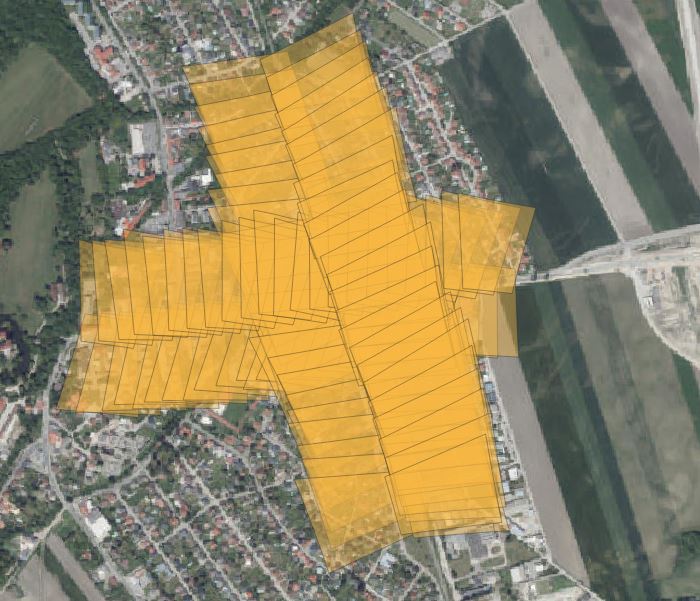

03-01 - Footprint of Images#
The following example illustrates how to use and initialize image batches. This can be useful if you want to run methods on a batch of images.
In this case, a ariel flight with 2 cameras pointing oblique right and left away. for the cameras, pre-calibration exists and is used for the camera class.
The image orientation are stored in a CSV file and is directly derived from a IMU postprocessing. This is a good case example as for that data projection and mapping will not be as accurate if derived by a proper photogrammetric block. But special for such data this tool can provide an easy way to get footprint, mapped areas or approximate image pixel location for projected 3D points.
The Raster for mapping is a cutout from an austrian DTM with a resolution of 10 meter. The coordinate system of the raster is austrian lambert projection with the vertical datum GHA (austrian heights in use).
The workflow and methods are not much different to single images.
Example images:
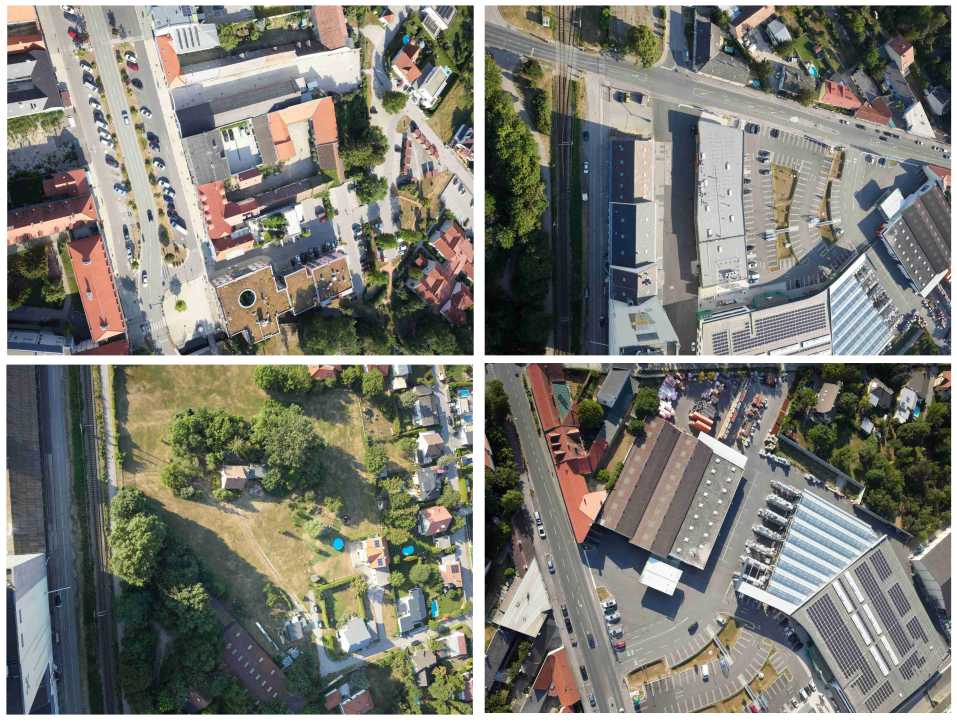
Following Steps need to be done: 1. Create mapper class 2. Create camera class 3. Create image class 4. Create ImageBatch class 5. Map footprint
Import Modules#
First we will import all needed Modules. The Raster Mapper module will be used for mapping.
import csv
import json
import sys
from collections.abc import Mapping
from pathlib import Path

import numpy as np
from pyproj import CRS
from pyproj import network as pyproj_network

from weitsicht import (
    CameraOpenCVPerspective,
    ImageBase,
    ImageBatch,
    ImagePerspective,
    MappingRaster,
    Rotation,
)

DATA_DIR = Path(__file__).parent.resolve() / "data" / "ariel_flight"
Mapper Class#
# In that example we have different CRS systems of the image pose and the mapper
# therefore we need to activate the network capabilities of pyproj to get the needed grids for transformation
pyproj_network.set_network_enabled(True)  # type: ignore

# Austrian Lambert with Vertical Datum GHA (Austrian Heights)
crs_mapper = CRS("EPSG:31287+5778")
mapper_raster = MappingRaster(
    raster_path=DATA_DIR / "dtm_epsg31287plus5778.tif",
    crs=crs_mapper,
    preload_full_raster=True,
)
Camera Model#
Initialize the camera models of the image
# Cameras from pre calibration protocol
camera_right = CameraOpenCVPerspective(
    width=11664,
    height=8750,
    fx=9524.786,
    fy=9524.788,
    cx=5811.896,
    cy=4422.312,
    k1=1.598e-02,
    k2=-7.004e-02,
    k3=1.940e-02,
    k4=6.022e-03,
    p1=1.016e-05,
    p2=1.284e-05,
)

camera_left = CameraOpenCVPerspective(
    width=11664,
    height=8750,
    fx=9520.292,
    fy=9520.292,
    cx=5850.933,
    cy=4375.201,
    k1=1.523e-02,
    k2=-6.958e-02,
    k3=1.942e-02,
    k4=5.851e-03,
    p1=-8.637e-05,
    p2=3.504e-05,
)
Parse images from CSV#
# The image ext ori is exported from the IMU/GNSS in UTM33 with ellipsoid heights.
# So to upgrade UTM to a 3D system using ellipsoid heights there is the command to_3d()
image_crs = CRS("EPSG:25833").to_3d()

# so type checker are not complaining that we are assigning ImageBase children to image_dict
image_dict: Mapping[str, ImageBase] = {}

# Parse the information of the exterior orientation from CSV files
# There are two files for the 2 cameras with the EOR information

# Using CSV reader as its part of python
# The csv files look like that following
# Filename,Easting,Northing,Height,Omega[deg],Phi[deg],Kappa[deg]
# P0009080_r1_cam3.jpg,604524.2107,5313148.5753,397.1245,20.350469123,-0.742671787,81.475314318
# P0009081_r1_cam3.jpg,604566.2565,5313155.3605,397.7679,19.673615822,0.774277423,84.003988648

# Images from the right camera
with open(DATA_DIR / "eor_camera_right.csv", newline="") as csvfile:
    reader = csv.DictReader(csvfile)
    for row in reader:
        pos = np.array([float(row["Easting"]), float(row["Northing"]), float(row["Height"])])
        rot = Rotation.from_opk_degree(
            omega=float(row["Omega[deg]"]),
            phi=float(row["Phi[deg]"]),
            kappa=float(row["Kappa[deg]"]),
        )

        # Add the image to the dictionary which is used for the image batch
        image_dict[row["Filename"]] = ImagePerspective(
            width=2333,
            height=1750,
            camera=camera_right,
            position=pos,
            orientation=rot,
            crs=image_crs,
        )

# Images from the left camera
with open(DATA_DIR / "eor_camera_left.csv", newline="") as csvfile:
    reader = csv.DictReader(csvfile)
    for row in reader:
        pos = np.array([float(row["Easting"]), float(row["Northing"]), float(row["Height"])])
        rot = Rotation.from_opk_degree(
            omega=float(row["Omega[deg]"]),
            phi=float(row["Phi[deg]"]),
            kappa=float(row["Kappa[deg]"]),
        )

        # Add the image to the dictionary which is used for the image batch
        image_dict[row["Filename"]] = ImagePerspective(
            width=2333,
            height=1750,
            camera=camera_left,
            position=pos,
            orientation=rot,
            crs=image_crs,
        )
ImageBatch Class#
# Initialize the image Batch by the dictionary
images = ImageBatch(image_dict, mapper=mapper_raster._georef_array)
Map images footprints of image batch#
results = images.map_footprint(points_per_edge=4)

# Example: inspect normals and per-point GSD for one footprint (printed to stderr to keep stdout as valid JSON).
for key, result in results.items():
    if result.ok is True:
        idx = np.flatnonzero(result.mask)
        if idx.size > 0:
            print(f"Example '{key}' normals (first 3): {result.normals[idx[:3]]}", file=sys.stderr)
            if result.gsd_per_point is not None:
                print(f"Example '{key}' gsd_per_point (first 3): {result.gsd_per_point[idx[:3]]}", file=sys.stderr)
        break

geo_dict = {"type": "FeatureCollection", "features": []}

features = []
for key, result in results.items():
    if result.ok is True:
        features.append(
            {
                "type": "Feature",
                "image_name": key,
                "geometry": {
                    "type": "Polygon",
                    "coordinates": [result.coordinates.tolist()],
                },
            }
        )
geo_dict["features"] = features
print(json.dumps(geo_dict, indent=4))
The mapped footprints of the images of the batch: