

Raster Mapper#
The raster mapper weitsicht.MappingRaster uses a raster DEM/DSM to:
sample heights for given ground coordinates, and
intersect rays (e.g. from a perspective image) with the raster surface to obtain 3D hit points.
Internally it uses rasterio for IO and sampling.
Memory and IO behavior#
By default, MappingRaster does not load the raster into memory. It keeps a
rasterio.DatasetReader open and reads only the height values needed at runtime (e.g. via sampling).
Only when you explicitly enable window/full preloading (preload_full_raster, preload_window) or call
load_window() is raster data read into a numpy array and stored in
georef_array (a MappingGeorefArray instance).
When georef_array is present, map_coordinates_from_rays()
and map_heights_from_coordinates() automatically delegate to that in-memory backend.
This avoids disk IO and uses the (more accurate) bilinear-patch ray intersection model implemented by
MappingGeorefArray.
When to use this mapper#
Use MappingRaster when you have a DEM/DSM and want terrain-aware pixel-to-ground mapping:
drone imagery over terrain
wildlife surveys over variable relief
any use-case where a flat plane is not a good approximation
Initialization requirements#
You must provide a readable raster file path. Common configuration parameters:
raster_path: path to a file supported by rasterio (GeoTIFF is typical).index_band: required if the dataset has more than one band (bands start at 1).crs: optional override of the raster CRS.force_no_crs: force CRS toNone(advanced; only safe if you know everything is in the same CRS).preload_full_raster/preload_window: optional in-memory loading for faster repeated operations.
If a mapper CRS is set (either from the raster metadata or via crs=...), it must be 3D (have a Z axis).
CRS and projections#
The raster itself can be stored in many different coordinate systems. Typical examples are:
projected CRSs in meters (UTM, Lambert Conformal Conic, national grids, …),
geographic (ellipsoidal) CRSs in degrees (lon/lat) with a height axis.
weitsicht can work across different CRSs by transforming points between the input CRS (crs_s) and the mapper CRS.
See Coordinate Transformations for details.
Important
Ray/line intersection math assumes an approximately Euclidean coordinate system with linear units in XY. For reliable ray intersections, provide rays in a projected (meter-based) 3D CRS where Z represents height.
Do not run ray intersections directly in lon/lat degrees; if your poses are in geographic coordinates, transform them to a suitable projected CRS first, and transform results back afterwards if needed.
Core methods#
Height sampling (coordinates → heights)#
map_heights_from_coordinates(...) takes (x, y) (or (x, y, z)) coordinates and returns 3D coordinates
with a bilinear interpolated height from the raster.
Notes:
bilinear interpolation is used (a 2×2 window around the target pixel),
coordinates outside the raster are masked and return
Issue.OUTSIDE_RASTER.
Ray intersections (rays → surface hits)#
map_coordinates_from_rays(...) intersects rays with the raster surface and returns 3D hit points.
High-level behavior:
rays are tested per input element,
rays that never intersect the raster surface in a valid direction are masked and may add
Issue.WRONG_DIRECTION,rays leaving the raster extent are masked and add
Issue.OUTSIDE_RASTER.rays touching raster no-data cells (holes) are masked and may add
Issue.RASTER_NO_DATA,rays where the iterative intersection does not converge are masked and may add
Issue.MAX_ITTERATION.
How ray intersections work (iterative ray–plane intersection)#
The disk-backed raster mapper uses an iterative approach to find an intersection between a 3D ray and a raster height field. Conceptually, the raster is treated as a function:
and for each ray the mapper searches for a parameter \(t\) such that:
Implementation idea (in words):
Transform the ray start point (\(X_c,Y_c,Z_c\)) (projection center) into the raster crs (\(x_c,y_c,z_c\)).
Get the raster height \(z_r\) for \(x_c,y_c\).
Guess intial plane height \(z_i\) between the camera height \(z_c\) and the raster height \(z_r\).
The plane point (\(x_i,y_i,z_i\)) is now initial (\(x_c,y_c,z_i\)).
Transform that plane point (\(x_i,y_i,z_i\)) and vertical vector back to source crs (\(X_p,Y_p,Z_p\))
Intersect the ray with that plane (ray–plane intersection) -> result intersection point (\(X_i,Y_i,Z_i\))
Transform that intersection point (\(X_i,Y_i,Z_i\)) into the raster CRS (\(x_i,y_i,z_i\)).
Sample the raster height at its \((x_i, y_i)\).
Update the plane height \(z_i\) guess toward the sampled height (a damped update is used to reduce oscillation).
Repeat from (5) on
Stopping criteria:
the height difference between the current plane guess and the sampled raster height falls below ~2 cm, or
a maximum iteration count is reached (then the ray is treated as not intersecting reliably).
The following figure shows the idea in a vertical profile (X–Z slice): each iteration intersects the ray with a horizontal plane \(z = z_i\), samples the raster height at the resulting \((x, y)\) location, and updates the next plane height guess.
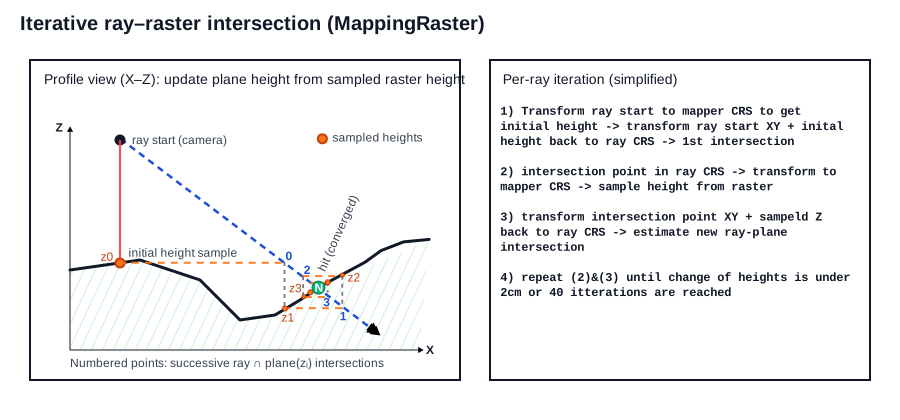
Iterative ray–raster intersection as used by weitsicht.MappingRaster.#
Note
This approach keeps the ray direction vector in the source CRS and transforms points into the raster CRS for sampling. This avoids transforming direction vectors through potentially non-linear CRS operations, but it requires multiple point transformations and raster samples per ray.
In-memory window (optional)#
If you repeatedly intersect many rays within a limited raster extent, you can load a raster subset into memory.
MappingRaster.load_window(...) populates mapper.georef_array (and also returns it) as a
MappingGeorefArray instance. Once loaded, MappingRaster.map_* methods automatically use this
in-memory backend.
Convenience helpers:
mapper.backendreturns the active backend (MappingGeorefArrayif loaded, otherwiseMappingRaster).mapper.georef_mapperreturns the cached backend or raises if no window/full raster is loaded.
Important
If you cache only a window, mapping operations are limited to that cached extent. Points/rays outside the cached window
will be reported as Issue.OUTSIDE_RASTER.
For details about the in-memory backend (including its bilinear patch ray intersection model), see GeorefArray Mapper.
Minimal example#
import numpy as np
from pyproj import CRS
from weitsicht import MappingRaster

mapper = MappingRaster(
    raster_path="dem.tif",
    crs=CRS.from_epsg(32633),  # optional override; otherwise read from the file
    index_band=1,              # required if the raster has multiple bands
)

# Height sampling
xy = np.array([[601932.0, 5340348.0], [601948.0, 5340359.0]])
res_h = mapper.map_heights_from_coordinates(xy, crs_s=mapper.crs)

# Ray intersections (origins + direction vectors must be in the same source CRS)
# hits = mapper.map_coordinates_from_rays(ray_vectors, ray_starts, crs_s=image_crs)