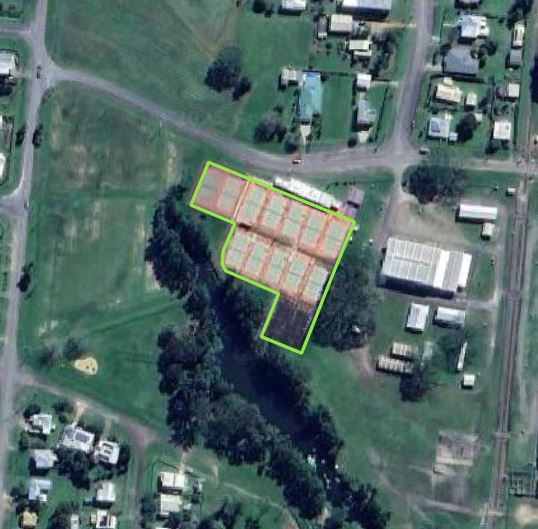

01-02 - Image Points#
The following example illustrates how to map image pixel coordinates. Here we use the same data as already created in example 01-01 - Footprint & CenterPoint
To map image coordinates one need minimum the following information:
Image EOR (exterior orientation: Position and Attitude of the projection center
Image IOR (inner orientation: Focal length (the minimum to know), principal point and distortion parameters
3D information about the geometry which is captured by the image (Terrain Model, Mesh). In this example terrain data in form of a 1 meter resolution DEM is used from queensland.
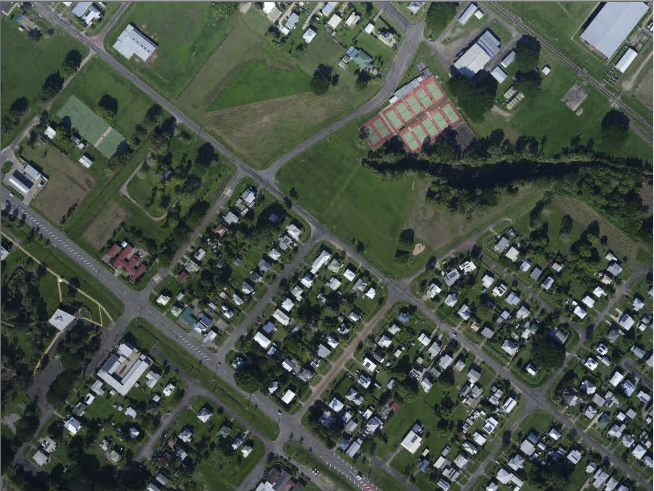
The digitized polygon on the following image should be mapped:
Preparation#
import logging
from pathlib import Path

import numpy as np
from pyproj import CRS
from pyproj import network as pyproj_network

from weitsicht import (
    CameraOpenCVPerspective,
    ImagePerspective,
    MappingRaster,
    Rotation,
)

logging.basicConfig(level=logging.WARNING)
logging.getLogger("weitsicht").setLevel(logging.DEBUG)

# path to the raster file
DATA_DIR = Path(__file__).parent.resolve() / "data"

# PyProj
# In that example we have different CRS systems of the image pose and the mapper
# and therefore we need to activate the network capabilities of pyproj to get the needed grids for transformation
# Alternatively one could specify a directory where grids ares stored
pyproj_network.set_network_enabled(True)  # pyright: ignore[reportPrivateImportUsage]


# Camera Model
cam = CameraOpenCVPerspective(
    width=11648,
    height=8736,
    fx=12906.9238,
    fy=12906.9238,
    cx=5858.437,
    cy=4400.116,
    k1=-0.00565896,
    k2=0.0334872,
    k3=-0.0683847,
    p1=0.000933359,
    p2=0.00065228,
)

# Prepare Image
# Position of image's projection center
position = np.array([410978.864, 7936876.318, 973.942])
# Attitude of image
orientation = Rotation.from_opk_degree(omega=0.9376, phi=-0.6203, kappa=-56.9427)
# Image Coordinate Reference System
# Australian Projection with the height system AHD (Australian Height datum)
image_crs = CRS("EPSG:7855+5711")  # GDA2020 / MGA zone 55

# The eleveation raster is in GDA94 / MGA zone 55 with the vertical datum AHD (5111)
mapper_crs = CRS("EPSG:28355+5711")
# We will preload the full raster as it is not very large.
mapper = MappingRaster(
    raster_path=DATA_DIR / "dem_01_gda94_mga55_ahd.tif",
    crs=mapper_crs,
    preload_full_raster=True,
)

# Initializing image class
# If you would want to work with resampled images than width and height can
# be stated for image separately to the one from the camera
image = ImagePerspective(
    width=11648,
    height=8736,
    camera=cam,
    position=position,
    orientation=orientation,
    crs=image_crs,
    mapper=mapper,
)
Map images points#
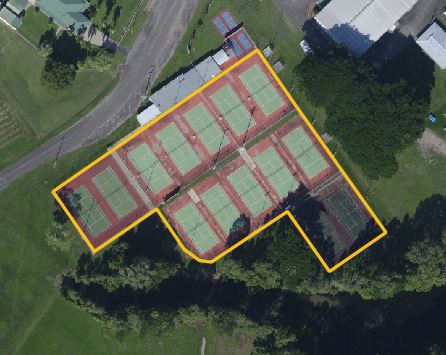
To map image points the image coordinates need to be specified which should be mapped. The image shows the zoomed area of the tennis court with the digitized polygon in the image.
# In this example we have assigned the mapper already during the image class initialization.
# The image points have to be in pixel as per image coordinate definition
tennis_court = np.array(
    [
        [7706.2, 1333.0],
        [6381.6, 2250.7],
        [6650.8, 2639.7],
        [7054.4, 2364.1],
        [7231.2, 2623.5],
        [7331.7, 2698.1],
        [7409.5, 2707.8],
        [7902.3, 2380.3],
        [8174.7, 2769.4],
        [8541.1, 2516.5],
        [7968.8, 1712.4],
        [7706.2, 1333.0],
    ]
)

result = image.map_points(tennis_court)

# The returned coordinates will be in the CRS of the image
if result.ok is True:
    # Map points returns the coordinates, the mean GSD of the points and a mask
    print("Coordinates:", result.coordinates)
    print(f"Mean GSD {result.gsd:2.3f} m")
    print("Mask of mapped points", result.mask)
    print("Normals:", result.normals)
    if result.gsd_per_point is not None:
        print("GSD per point:", result.gsd_per_point)
assert result.ok is True  # for testing
The mapped points of the tennis court on a map. The returned coordinates will be in the image’s crs