

04-01 - Digitize Dugongs#
The following example demonstrates a full workflow where a set of images is stored in a folder (e.g. drone flight) and how digitized objects, a dugong in this case, can be mapped and the approximate appearance in other images can be estimated.
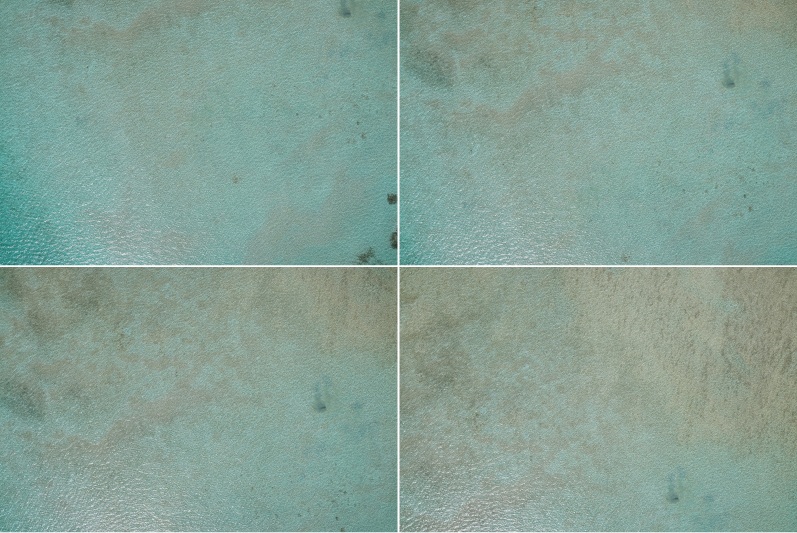
Sample images of a drone flight.#
Note
This example can be used to run with exiftool from phil harvey and the wrapper PyExiftool. Still the same meta-data is saved as “.json” within the directory so that exiftool is not needed to run the example
Import Modules#
import json
from pathlib import Path

import numpy as np
from pyproj import CRS
from pyproj import network as pyproj_network

from weitsicht import (
    ImageBatch,
    MappingHorizontalPlane,
    PyExifToolTags,
    image_from_meta,
)

DATA_DIR = Path(__file__).parent.resolve() / "data"
Extract Meta Data#
# This example can be used to run with exiftool from phil harvey.
# Still the same meta-data is saved under within the directory so that exiftool is not needed to run the example

# To run with pyexiftool under windows you will need to specify the exiftool.exe path either in your PATHS
# or specify the path to the executable manually --> et = ExifToolHelper(executable=PATH_TO_EXIF)
et_helper = None
try:
    from exiftool import ExifToolHelper  # pyright: ignore[reportMissingImports]

    try:
        et_helper = ExifToolHelper()
        print("Exiftool via PyExifTool is used")
    except (RuntimeError, TypeError, NameError, FileNotFoundError):
        pass
except ModuleNotFoundError:
    pass

# If exiftool is found on your system we will use it, otherwise the stored jsons
meta_data_dict = {}
if et_helper is not None:
    for file in (DATA_DIR / "dugong_survey").glob("*.jpg"):
        meta_data = et_helper.get_tags(file, tags=None)[0]
        meta_data_dict[file.stem] = meta_data

else:
    for file in (DATA_DIR / "dugong_survey").glob("*.json"):
        meta_data = json.load(open(file))
        meta_data_dict[file.stem] = meta_data
PyProj#
# In that example we have different CRS systems of the image pose and the mapper
# and therefore we need to activate the network capabilities of pyproj to get the needed grids for transformation
# Alternatively one could specify a directory where grids ares stored
pyproj_network.set_network_enabled(True)  # type: ignore
Initiate Mapper class#
# For that example the mapper class horizontal mapper is used with an altitude of the plane with 0.0 for sea surface.
# To have the correct coordinate reference system where the mean sea level with a height of 0.0 can be used,
# a vertical reference system based on a geoid need to be used, for example EGM2008 with the EPSG code 3855.
# That vertical reference system can be used together with a 2D horizontal reference system like WGS84(EPSG:4326)
crs_mapper = CRS("EPSG:4326+3855")
mapper_0h = MappingHorizontalPlane(plane_altitude=0.0, crs=crs_mapper)
Meta-Data Parsing#
# Use Tag-Parser to estimate image information from meta-data
# PyExifToolTags(meta_data) will return a class where you can access different tags
# with .get_all() you get a dataclass with all dataclasses stored in it for IOR and EOR
image_dict = {}
for key, meta_data in meta_data_dict.items():
    tags = PyExifToolTags(meta_data)
    img_res = image_from_meta(tags)  # accepts MetaTagsBase or MetaTagAll
    if img_res.ok is False:
        raise RuntimeError(f"Failed to build image '{key}' from metadata: {img_res.error} ({img_res.issues})")
    image_dict[key] = img_res.image
Image Batch#
# Initialize image batch class
# During the that call all images will be assigned that mapper if no mapper is present for a single image
images = ImageBatch(images=image_dict, mapper=mapper_0h)
Mapping of digitized point#
In that example a dugong was found in one of the images and digitized by hand or by AI. The center of the objects which was digitized in image003.jpg is:
1292, 564
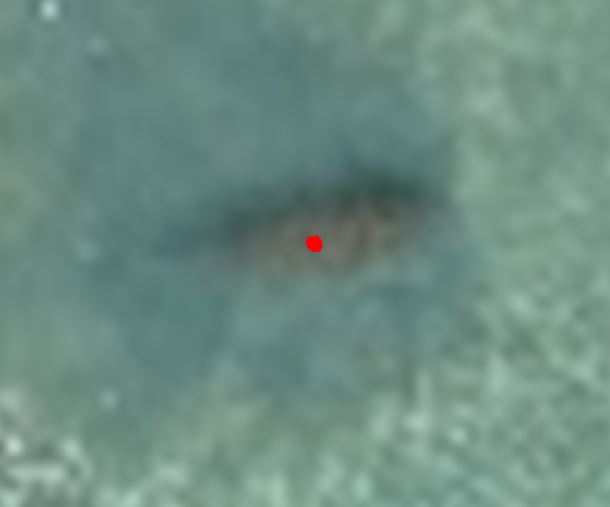
The digitized dugong in image 003#
# In that example a dugong was found in one of the images and digitized by hand or by AI.
# The center of the objects which was digitized in `image003.jpg` is:
# image coordinates in pixel need to be a numpy array of size Nx2.
object_digitized = np.array([[1292, 564]])

# The ImageBatch itself has no "map_points" as it makes no sense to map for each image the same pixels.
# images['image003'] is the single image class.
result_mapping = images["image003"].map_points(object_digitized)

if result_mapping.ok is True:
    coo = result_mapping.coordinates
    gsd = result_mapping.gsd
    print("Mapped coordinate(s):", result_mapping.coordinates[result_mapping.mask])
    print("Normals (valid):", result_mapping.normals[result_mapping.mask])
    if result_mapping.gsd_per_point is not None:
        print("GSD per point (valid):", result_mapping.gsd_per_point[result_mapping.mask])
    print("Mean GSD:", gsd)
else:
    raise ValueError("Result mapping should have worked")
Find projection in all other images#
# As each image can have a different coordinate reference system
# We will use that CRS from the image the object is mapped as the crs system which we say the mapped points are in
crs_mapped_points = images["image003"].crs

# with .project(..) we will get for each image the projections of the coordinates specified.

result_projections = images.project(coo, crs_mapped_points)

if result_projections is not None:
    print("All projections")
    for key, prj_result in result_projections.items():
        if prj_result.ok is True:
            print(key, prj_result.pixels)
assert result_projections is not None  # for testing
No we get for all images in the image batch the projected pixels and a mask if the projection is valid. A projection is only valid if its inside the distortion border of the image.
image001 (array([[1385.37313612, 51.86895822]]), array([ True])) image002 (array([[1320.55732947, 337.27117976]]), array([ True])) image003 (array([[1292., 564.]]), array([ True])) image004 (array([[1111.88306103, 929.0284043 ]]), array([ True]))
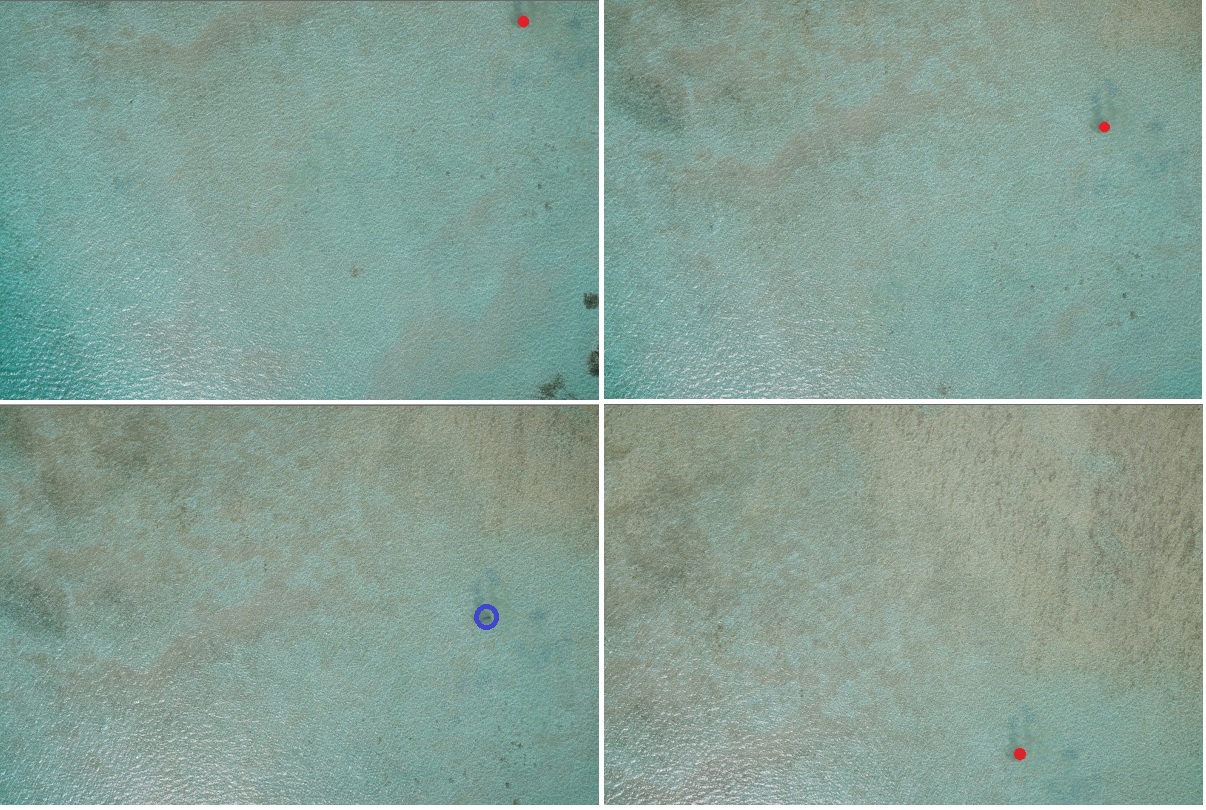
Red dots are the projections of the mapped blue boint.#
This information can than be used to find the objects in other images in a GUI like WISDAMapp easier.
Filtered Result#
# using images.project(..., only_valid=True) the returned dictionary will only
# contain images with valid projections

# modify the coordinates to get less projections
coo_shifted = coo + np.array([30, 0, 0])
result_projections = images.project(coo_shifted, crs_mapped_points, only_valid=True)

if result_projections is not None:
    print("Filtered projections")
    for key, prj_result in result_projections.items():
        if prj_result.ok is True:
            print(key, prj_result.pixels)
assert result_projections is not None  # for testing
Filtered projections. Only one image is returned
image004 (array([[1413.14434847, 968.62647658]]), array([ True]))